Color by Numbers - Halloween +3.0.8
Publisher Description

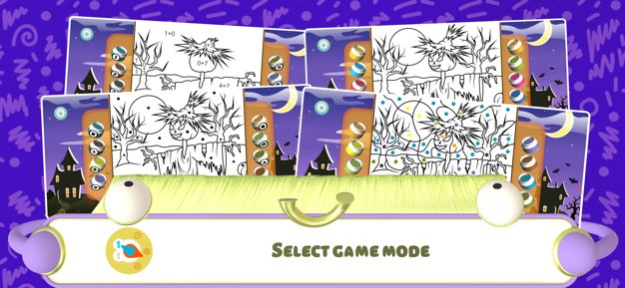

Every year, boys and girls all over the world eagerly await Halloween. For on this night, the most mysterious supernatural things occur. These coloring pages depict the main symbols of Halloween, conjuring up all the ancient stories and legends. In coloring these in, your kids will feel the distinctive mood of this mystical night.
Benefits:
◦ Teaching children simple arithmetic. Addition and subtraction
◦ Coloring by geometrical figures and pictograms
◦ Coloring by letters
◦ Very simple program interface that any child can master
◦ Easy-to-use palette that allows you to put together your own unique set of colors
◦ High-quality drawings of all pictures
◦ Visual effects and sound effects
◦ Pleasing background music
◦ Colored pictures automatically saved on closing the program
◦ And many other useful features that make coloring entertaining
Paint by numbers - an interactive coloring book for children. This mathematical game teaches children to recognize numbers and solve simple mathematical examples. In addition, this program develops memory, attention, imagination, and logical abilities.
Boys and girls of all ages love to color. The simple coloring mode is suitable for the smallest of children, including those of kindergarten and preschool age. These include simple and recognizable images that are easy to color. If the child selects the wrong shape, then they will be prompted with the correct number. Therefore, the picture will always be colored correctly, and the child will quickly memorize the numbers. Children can choose to color by geometrical figures and pictograms in addition to numbers. A child can easily distinguish a square from a circle, diamond, and triangle.
School-age children will enjoy the complex coloring mode. Here the picture is divided into a large number of elements, thus making it difficult at first to determine what it depicts. Older children can complicate the task by adding addition and subtraction tasks. Now children will need to solve the examples and choose the correct answers in order to color the picture. This will teach the child how to quickly do arithmetic in their mind.
Those who are learning the alphabet can choose to color by letter. Coloring by letters will be useful for children preparing to enter primary school.
To make the coloring process more interesting and fun, you can change any of the preset colors. To do this, press and hold the jar of paint and a palette will open. Then you can choose your favorite color. Thus, all the shaded areas of the image can be changed in the coloring by number mode. You can have fun by changing the color scheme to suit your taste. Try the program right now!
Version History Thank you for using our apps. Here are some details of the coming update:
- Bug fixes and minor gameplay improvements. 3.0.8 10/29/2025 Small fixes 2.1 01/28/2019 - Added a new coloring mode for children under 4. It doesn't require you to pick colors - just click on images and they will be filled with the right colors on their own.
- Added a new game mode where images are colored by layers - from the largest elements to the smallest ones.
- Added the possibility to save images to the photos folder
- iPhone X support 2.0 12/17/2017 - Increased drawing area
- Bugs fixed 1.7 08/02/2016 Coloring by letters mode added
Coloring by geometrical shapes mode added
Simplified coloring mode added in which larger numbers and small elements are colored automatically
Picture navigation improved 1.6 02/24/2016 - Bugs fixed
- iOS 9 1.4 09/25/2015 - Performance improvements
- Lots of optimizations
- Added support for iPhone 6 and iPhone 6+
- Bugs fixed 1.3.0 08/07/2015 - iOS7 icon has been added
- Bugs fixed 1.2.1 10/01/2013 - added modes with examples (addition and subtraction)
- iPhone support
- new icon 1.2.0 09/23/2013 - Continuous pressing on tube causes palette to appear
- Improved palette
- Significantly reduced program size
- Simplified interface
- Bugs fixed 1.1.0 08/14/2013 1.0.0 10/02/2012
About Color by Numbers - Halloween +
The company that develops Color by Numbers - Halloween + is Kedronic UAB. The latest version released by its developer is 3.0.8.
To install Color by Numbers - Halloween + on your iOS device, just click the green Continue To App button above to start the installation process. The app is listed on our website since 2026-10-14 and was downloaded 6 times. We have already checked if the download link is safe, however for your own protection we recommend that you scan the downloaded app with your antivirus. Your antivirus may detect the Color by Numbers - Halloween + as malware if the download link is broken.
How to install Color by Numbers - Halloween + on your iOS device:
- Click on the Continue To App button on our website. This will redirect you to the App Store.
- Once the Color by Numbers - Halloween + is shown in the iTunes listing of your iOS device, you can start its download and installation. Tap on the GET button to the right of the app to start downloading it.
- If you are not logged-in the iOS appstore app, you'll be prompted for your your Apple ID and/or password.
- After Color by Numbers - Halloween + is downloaded, you'll see an INSTALL button to the right. Tap on it to start the actual installation of the iOS app.
- Once installation is finished you can tap on the OPEN button to start it. Its icon will also be added to your device home screen.
Program Details
System requirements
Download information
Pricing
Version History
version 3.0.8
posted on 2026-10-14
Version History Thank you for using our apps. Here are some details of the coming update:
- Bug fixes and minor gameplay improvements. 3.0.8 10/29/2025 Small fixes 2.1 01/28/2019 - Added a new coloring mode for children under 4. It doesn't require you to pick colors - just click on images and they will be filled with the right colors on their own.
- Added a new game mode where images are colored by layers - from the largest elements to the smallest ones.
- Added the possibility to save images to the photos folder
- iPhone X support 2.0 12/17/2017 - Increased drawing area
- Bugs fixed 1.7 08/02/2016 Coloring by letters mode added
Coloring by geometrical shapes mode added
Simplified coloring mode added in which larger numbers and small elements are colored automatically
Picture navigation improved 1.6 02/24/2016 - Bugs fixed
- iOS 9 1.4 09/25/2015 - Performance improvements
- Lots of optimizations
- Added support for iPhone 6 and iPhone 6+
- Bugs fixed 1.3.0 08/07/2015 - iOS7 icon has been added
- Bugs fixed 1.2.1 10/01/2013 - added modes with examples (addition and subtraction)
- iPhone support
- new icon 1.2.0 09/23/2013 - Continuous pressing on tube causes palette to appear
- Improved palette
- Significantly reduced program size
- Simplified interface
- Bugs fixed 1.1.0 08/14/2013 1.0.0 10/02/2012
version 3.0.8
posted on 2025-10-29
Thank you for using our apps. Here are some details of the coming update:
- Bug fixes and minor gameplay improvements.
version 2.1
posted on 2019-01-28
Jan 28, 2019 Version 2.1
Small fixes
version 2.1
posted on 2019-01-28
28 Jan 2019 Version 2.1
Small fixes
version 1.7
posted on 2012-10-02
version 2.1
posted on 1970-01-01
2019년 1월 28일 Version 2.1
Small fixes
version 2.1
posted on 1970-01-01
28. led 2019 Version 2.1
Small fixes
version 2.1
posted on 1970-01-01
2019年1月28日 Version 2.1
Small fixes
version 2.1
posted on 1970-01-01
28 de ene. de 2019 Version 2.1
Small fixes
version 2.1
posted on 1970-01-01
28 sty 2019 Version 2.1
Small fixes
